
How to Set Up a CI/CD Pipeline Using GitHub Actions
A CI/CD pipeline automates checks, builds, and deployments for every commit.
What is CI/CD? (Quick Refresher)
Before setting up the pipeline, let’s recap the three core concepts:
Continuous Integration (CI)
In a collaborative environment, multiple developers work on separate features. Once completed, each feature is merged into the shared repository. With CI, every merge triggers automated builds and tests to catch bugs early.
Continuous Delivery (CD)
This goes a step further - once the code passes all tests, it’s automatically built and deployed to a staging environment, making it ready for production release.
Continuous Deployment (CD)
The final stage automates deployment to production. Every successful commit moves straight into the live environment, ensuring users always experience the latest stable version.
Setting Up the Project
For our hands-on guide, let’s assume we’re working with a small React application. (You can follow the same steps for a Node.js API, Python app, or static site with slight modifications.)
Create a new React app:
Push it to a new GitHub repository:
Now we’re ready to integrate GitHub Actions.
Setting Up GitHub Actions Workflow
A workflow in GitHub Actions is an automated process that runs one or more jobs based on events in your repository. Think of it as a blueprint that tells GitHub when to trigger automation (like on every push or pull request) and what steps to run (such as installing dependencies, running tests, or deploying your app).
Workflows live inside a .github/workflows/ directory. Let’s create one:
Inside main.yml, we’ll define the CI/CD pipeline.
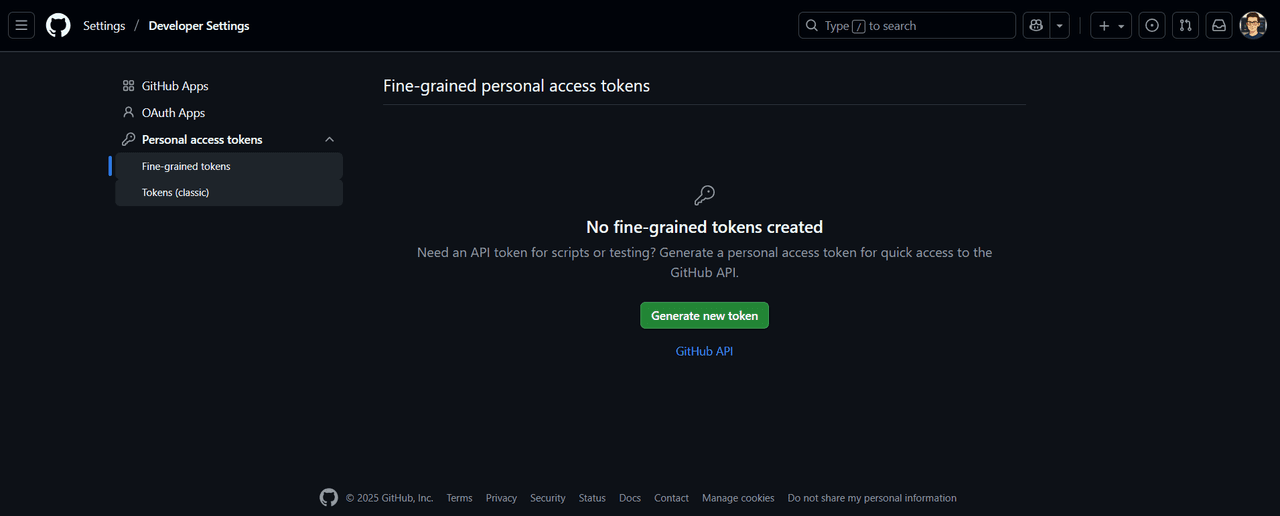
Step 1: Creating a GitHub Personal Access Token
-
Go to GitHub > Settings > Developer Settings > Personal Access Tokens.
-
Create a new token with repo permissions.
-
Copy the token.
-
In your repository, go to Settings > Secrets and variables > Actions.
-
Add a new secret named DEPLOY_KEY and paste the token.
Step 2: Writing the Workflow (YAML)
Here is a simple and common GitHub Actions workflow YAML example for Continuous Integration (CI) that you can customize for your projects
name: CI

on:
  push:
    branches:
      - main
      - master
  pull_request:
    branches:
      - main
      - master

jobs:
  build-and-test:
    runs-on: ubuntu-latest

    steps:
      - name: Checkout code
        uses: actions/checkout@v3

      - name: Setup Node.js environment
        uses: actions/setup-node@v3
        with:
          node-version: 18

      - name: Install dependencies
        run: npm install

      - name: Run lint check
        run: npm run lint

      - name: Run tests
        run: npm test

      - name: Build project
        run: npm run build
Step 3: Updating package.json
Add the homepage field so React knows the deployment URL:
"homepage": "https://<username>.github.io/<repo>"Step 4: Watching the Workflow in Action
-
Go to your GitHub repository.
-
Click on the Actions tab.
-
You’ll see the workflow automatically run.
-
After success, visit
https://<username>.github.io/<repo>/to see your app live. Now, every push to main will trigger this CI/CD pipeline.
Why GitHub Actions for CI/CD?
There are many CI/CD tools out there—Jenkins, GitLab CI, CircleCI—but GitHub Actions has quickly become a favorite because it brings CI/CD closer to your code.
-
Native GitHub Integration
Since your code is already on GitHub, you don’t need extra setup or webhooks. Workflows trigger directly from events likepushorpull_request. -
Free & Cost-Effective
Open-source projects get generous free minutes, and even private repos get enough to run small-to-medium pipelines without extra cost. -
Scalable
Start simple with one workflow, then grow into complex, multi-environment pipelines with approvals and deployments.
Conclusion
CI/CD is no longer optional it’s the standard for modern development teams. With GitHub Actions, you don’t need to juggle multiple tools or maintain complex infrastructure. You can build, test, and deploy directly from your repository.