
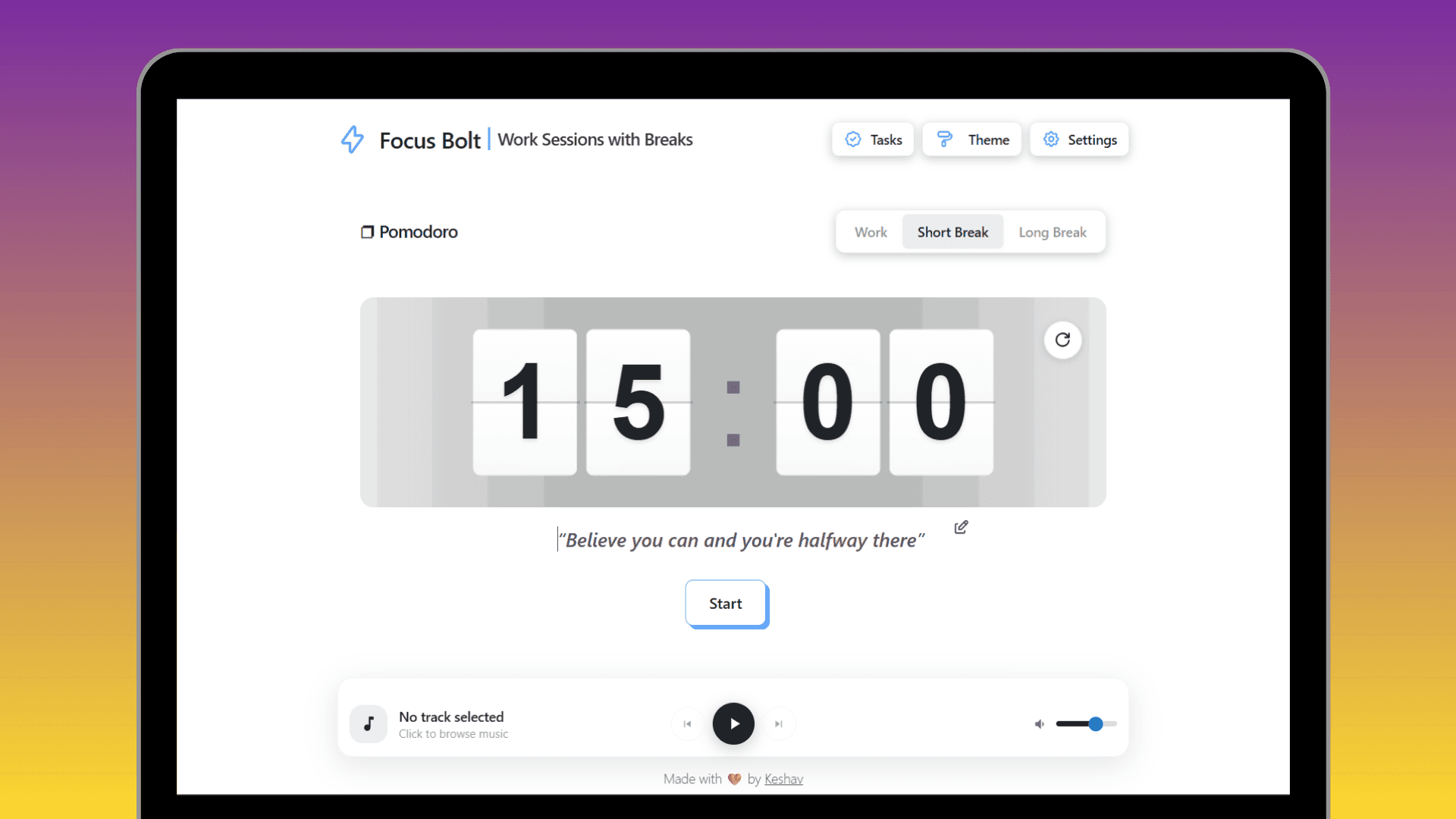
FocusBolt - Smart Pomodoro Focus Timer
A productivity powerhouse combining Pomodoro technique with ambient music, smart notifications, and beautiful themes to help you achieve deep work sessions
Timeline
September - October 2025
Role
Full Stack Developer
Team
Solo
Status
Beta TestingTechnology Stack
Key Challenges
- Cross-browser Notifications
- Audio Sync
- Theme System
- Performance
Key Learnings
- Browser APIs
- User Psychology
- Animation Optimization
- PWA Capabilities
Overview
FocusBolt is more than just another Pomodoro timer—it's a complete focus environment designed to help you enter deep work states and track your productivity journey. Built with modern web technologies, it combines proven time management techniques with ambient music integration, smart notifications, and a stunning visual experience.
Note: FocusBolt is currently in beta. We're actively testing and squashing bugs to ensure a smooth experience. Some features might evolve based on user feedback, but the core functionality is stable and ready for daily use.
Core Features
Smart Pomodoro System
- Customizable Timers: Adjust focus sessions (default 25 min), short breaks (5 min), and long breaks (15 min)
- Session Tracking: Automatic counting of completed pomodoros with visual progress
- Smart Notifications: Browser notifications with custom sounds when sessions end
- Pause & Resume: Full control over your focus sessions without losing progress
- Keyboard Shortcuts: Quick actions with spacebar and theme cycling for power users
Ambient Music Integration
- Music Bar: Built-in music player with smooth play/pause controls
- Focus Sounds: Curated ambient tracks designed for concentration
- Visual Controls: Clean, intuitive music interface that adapts to your theme
- Cross-tab Sync: Music state persists across browser tabs
- Custom Volume: Independent volume control for music and notification sounds
Beautiful Theme System
- Multiple Themes: Light, dark, and gradient themes with smooth transitions
- Keyboard Cycling: Quick theme switching with dedicated shortcuts
- Smart Contrast: Icons and text automatically adjust for readability
- Persistent Preferences: Your theme choice saves across sessions
- Accessibility Focused: High contrast options for all visual needs
Progress Tracking
- Weekly Deep Work: Visual representation of your focused hours
- Session History: Track completed pomodoros over time
- Productivity Insights: See patterns in your focus habits
- Goal Setting: Set and achieve weekly focus targets
Polished UI/UX
- Flip Clock Animation: Smooth, natural digit transitions with 3D effects
- Custom Scrollbar: App-wide beautiful scrollbar design
- Hover Effects: Subtle animations and ripple effects throughout
- Gradient Backgrounds: Eye-catching yet non-distracting visuals
- Loading States: Smooth transitions and loading indicators
Use Cases
Students
Perfect for study sessions with built-in breaks, helping maintain focus during exam prep or assignment work without burnout.
Developers
Ideal for deep coding sessions. The ambient music helps block distractions while the timer ensures regular breaks to prevent mental fatigue.
Writers & Creators
Great for writing sprints and creative work. The distraction-free interface keeps you in the flow state.
Remote Workers
Structure your workday with focused blocks. Track your productive hours and maintain work-life balance with enforced breaks.
Anyone Battling Distractions
Whether it's social media or constant notifications, FocusBolt creates a dedicated focus environment that helps you resist temptations.
Technical Challenges Solved
Cross-Browser Notification System
Getting notifications to work consistently across Chrome, Firefox, and Safari was tricky. Each browser handles permission requests differently, and iOS Safari has its own quirks. I implemented a robust permission handling system with graceful fallbacks and clear user prompts that respect browser limitations.
Audio Playback Reliability
Syncing music across different devices and handling autoplay restrictions required creative solutions. Built a custom audio management system that handles permission states, autoplay policies, and provides consistent playback across all browsers.
Smooth Animations at Scale
The flip clock animation needed to feel natural without tanking performance. Used CSS transforms with translate3d for hardware acceleration, optimized re-renders with React hooks, and implemented careful timing to achieve buttery-smooth digit transitions.
Theme System Architecture
Creating a theme system that updates instantly across all components while maintaining contrast and readability was complex. Implemented a centralized theme manager with CSS variables and intelligent color calculations for overlays and icons.
State Persistence
Maintaining timer state, preferences, and progress across page refreshes and browser restarts required thoughtful local storage management with data validation and migration strategies.
What I Learned
Building FocusBolt taught me a ton about browser APIs, user psychology, and the importance of polish in productivity tools. I dove deep into the Notification API, Web Audio API, and learned how small UX details—like hover effects and smooth transitions—make huge differences in how enjoyable an app feels to use daily.
The biggest lesson? Users stick with tools that respect their time and attention. Every feature needed to enhance focus, not distract from it.
Roadmap
While FocusBolt is functional and free to use, I'm continuously improving it based on feedback:
- Mobile App: Native iOS and Android versions
- Cloud Sync: Sync progress across devices
- Custom Sounds: Upload your own focus music
- Team Features: Shared focus sessions for remote teams
- Analytics: Deeper insights into productivity patterns
Try FocusBolt Today: It's completely free, no sign-up required. Just open it in your browser and start focusing. Found a bug or have a feature suggestion? I'd love to hear from you!